
Direct Debit Mandate - הקמת הרשאה לחיוב חשבון
Create a direct debit mandate link and receive status updates by webhook.
Create a digital authorization link so the debtor can approve future recurring charges against their bank account. Once approved, you can charge the debtor account on demand without further approval required by the debtor.
Supported Banks
Payment Provider Private accounts Business account Leumi/Pepper - 10 ✅ ✅ Poalim - 12 ✅ ✅ Discount/Mercantile - 11,17 ✅ BETA Mizrahi - 20 ✅ BETA FIBI group - 14,26,31,46,52 ✅ BETA
Prerequisites
Before you create a mandate authorization link:
- Register your organization to Masav to get your creditor organization code. Since charges are executed on Masav Rails, a Masav creditor account is mandatory.
How it Works?
The Mandate product digitizes the direct-debit authorization form. Your backend creates a signed JWT with, sends it to Feezback’s /link endpoint, and receives a link that you send to the debtor. The debtor confirms the mandate and Feezback update you on status changes.
Every Feezback Mandate Link follows the same underlying pattern:
- You sign a JWT (RS512) describing the details of the requested mandate:
- Creditor organization code
- Debtor details (optional)
- UI flow configurations (optional).
- You POST it to Feezback's Link Generation Service (LGS), which validates it and returns a link.
- You redirect the user to the link (from your app/website) or send that link to the detor via offline channels (email, SMS, in-app, a QR code, wherever makes sense for your product).
- The debtor opens the link and gets redirected for authentication and approval at their bank portal/app .
- You receive a webhook with the final mandate status, plus the debtor ID and account details.
- Feezback keeps monitoring the Mandate status and updates you with any change.
Environments
| Environment | Domain prefix | Link endpoint |
|---|---|---|
| Integration | lgs-integ01 | https://lgs-integ01.feezback.cloud/link |
| Production | lgs-prod | https://lgs-prod.feezback.cloud/link |
Creating a link - step by step
- Build a JWT with
srv: "mandate/user"and the mandate configuration. - Sign the JWT with your private key using
RS512. - Send the signed JWT to Feezback’s
/linkendpoint. - Send the returned link to the debtor.
- The debtor confirms his account details in Feezback’s UI.
- Feezback forwards the request to the debtor's bank for approval.
- Feezback sends a
MandateStatusChangedwebhook with the outcome.
1. Create the JWT payload
Configure the JWT payload according to the configuration guide.
Example payload:
{
  "iss": "tpp/987654",
  "srv": "mandate/user",
  "sub": "user-00112233",
  "flow": {
    "userWasAuthenticated": true,
    "context": "tx-20250113001",
    "userIdentifier": {
      "type": "ID",
      "value": "200200202",
      "editable": true
    },
    "mandate": {
      "creditor": {
        "name": "Electric Company Ltd",
        "organizationCode": "24562"
      },
      "debtor": {
        "account": "IL710110950000102188000",
        "accountType": "iban",
        "editable": true
      },
      "redirects": {
        "success": "https://merchant.com/success",
        "failure": "https://merchant.com/failure",
        "notComplete": "https://merchant.com/notComplete",
        "ttlExpired": "https://merchant.com/session-expired"
      }
    }
  }
}
2. Send the JWT to Feezback
Send the signed JWT to the /link endpoint for the selected environment.
curl --location --request POST 'https://{ENVIRONMENT}.feezback.cloud/link' \
  --header 'Content-Type: application/json' \
  --data-raw '{
    "token": "{GENERATED_JWT_TOKEN}"
  }'
Replace {ENVIRONMENT} with one of these values:
| Environment | URL |
|---|---|
| Integration | https://lgs-integ01.feezback.cloud/link |
| Production | https://lgs-prod.feezback.cloud/link |
Use the returned link to send the debtor into the mandate authorization flow.
The user may be redirected to your relevant web page according to the redirect link you configured in the request.
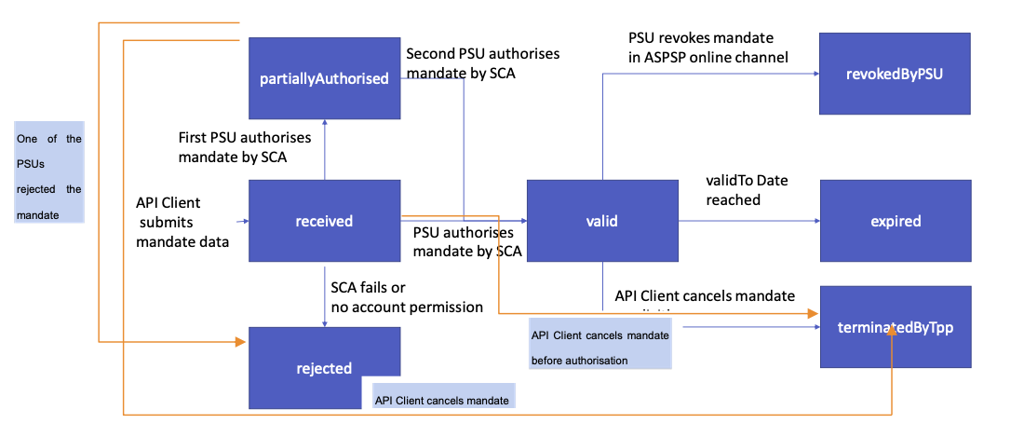
Mandate statuses
Feezback sends mandate status updates by webhook.
| Status | Meaning |
|---|---|
received | Request received by the bank. |
valid | Mandate is active. Charges may be run against it through Masav. |
partiallyAuthorized | Approved by one signatory; awaiting an additional co-signer. |
rejected | Declined by the bank or payer. |
expired | validUntil was reached. |
suspended | Suspended by the bank or the payer. |
terminatedByTpp | Cancelled by you. |
revokedByPsu | Revoked by the payer. |
revokedByAspsp | Revoked by the bank. |
Webhook events
Your webhook endpoint must return HTTP 200 within 3 seconds.
| Event | Fires when | Payload notes |
|---|---|---|
MandateStatusChanged | Any mandate status transition occurs. | Includes fields such as mandateId, psuId, accountNumber, previousStatus, currentStatus, and validUntil. |
MandateDataChanged | Underlying mandate data changes. | Includes data and updatedData. |
MandateAboutToExpire | The mandate is approaching validUntil. | May fire up to 30 days before expiry. |
Payload example
{
  "timestamp": "2021-03-04T12:26:32.212913+00:00",
  "event": "MandateStatusChanged",
  "payload": {
    "user": "user-00112233",
    "mandateId": "7fh64-fjue749-fn378hr004",
    "psuId": "222222222",
    "psuCorporateId": "519999999",
    "accountNumber": "10-123-1234567",
    "context": "tx-20250113001",
    "previousStatus": "received",
    "currentStatus": "valid",
    "validUntil": "null",
    "lastActionDate": "2025-03-04T12:26:32.212913+00:00",
  }
}
Testing mandate outcomes
Use the 5-digit test account 12345 with the following PSU IDs to test mandate outcomes.
| Test PSU ID | Result |
|---|---|
200200202 | Valid |
669029530 | Valid after a 15-second delay |
222822538 | Rejected |
200200301 | Partially authorized |
200200707 | Partially authorized, then valid after 5 minutes |
##
Updated about 1 month ago